
![LinkedIn Profile Optimization Tips [VIDEO]](http://3.bp.blogspot.com/-Yw8BIuvwoSQ/VsjkCIMoltI/AAAAAAAAC4c/s55PW6xEKn0/s1600-r/nth.png)

 Social Media
LinkedIn Rolls Out New Features Including Cover Story, Creator Mode, and more to Help You Stand Out
Like myself, we’re here on LinkedIn to connect with our professional network to bring …

Here’s a rundown of the new features:
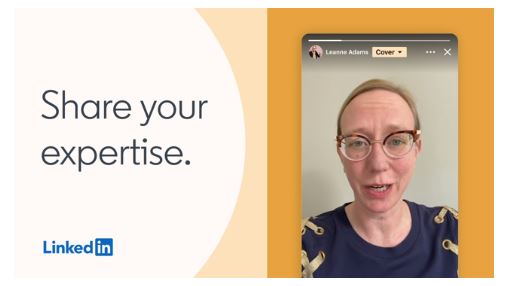
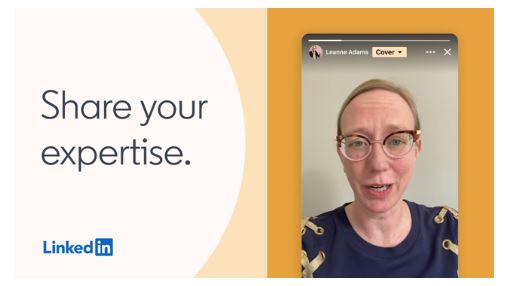
LinkedIn Stories was introduced last year to allow members and organisations to share images and videos of their daily professional moments. In this rollout, they’ve added a new feature that will enable members to upload a short video to their profile to share their skills, career goals, aspirations, and bring to life their stories.
For job seekers, it’s a great way to supplement their profile, introduce themselves, and reach recruiters. According to a recent survey by LinkedIn in the US, almost 80% of hiring managers believe that video has become important to interact with or vet candidates. Meanwhile, 60% of job seekers believe a recorded video could be the next cover letter.
If you’re a freelancer, this is another fantastic strategy to attract more clients by sharing your expertise and experience.
Once the cover story is added to your profile, an orange ring will appear around your profile photo. It will preview your video silently within your photo frame. How cool is that?!


LinkedIn is also rolling out an optional feature where members can add their preferred gender pronouns and showcase their core identity at the top of their profile.

For freelancers and small business owners, LinkedIn also added the Service Pages feature to help grow their business and reach nearly 740 million members. According to LinkedIn, these are dedicated landing pages to showcase services they offer for free. In addition, the services you list on your Service Page will display on your feed as well as your network.
With the Service Pages, people who are connected to you or not will be able to contact you about your services.
By the way, if you don’t see the “Showcase services” enabled on your profile, you can request access here.
LinkedIn also rolled out the all-new Creator Mode to highlight the work of content creators. With this mode, creators can add hashtags to indicate the topics they focus on. In addition, when this mode is enabled, the primary action on your profile will be updated to “Follow” from “Connect”, helping creators grow their audience. This mode would prominently display Featured content and Activity right below the profile section.
And for LinkedIn Live broadcasters, your Live broadcast will show on your profile background when you start streaming, increasing the visibility of your content.

To wrap up, I’m excited about these features as these would definitely present members in a more authentic and engaging way and help them achieve their professional goals.
What’s the feature you’re most excited about? Let me know in the comments below. 👇

Why you should optimize your LinkedIn profile
When LinkedIn launched in 2003, it aimed to connect people to become more productive and successful. LinkedIn was more of a recruitment platform back then connecting job seekers and employers. And that's exactly what I did back in 2014. I created a profile to increase my visibility to recruiters and showcase my work history for work opportunities.
Back then, it was as simple as creating your profile and listing your work history. Connect with your immediate colleagues, submit your resume, and you're done.
But as LinkedIn grew and diversified its business, more and more professionals and companies from every industry, small or large, are joining the community. LinkedIn reports it has 660 million users. Hence, all the more that we need to stand out from the crowd by building up a compelling profile.
When I transitioned to B2B selling in 2016, I realised the power of a great profile and presence on LinkedIn. I transformed my profile from an online resume to one that delivers value to my potential clients. As time went on, I’ve networked and connected with other professionals.
And in my job, it is important to build trust. It was crucial that I was deemed an expert and a resource in my field. I started sharing relevant information about our domain on LinkedIn, made valuable connections, and consulted with my audience with best practices. Eventually, I was able to convert individual leads into clients forming long-standing business partnerships from LinkedIn.
To those who are just getting started on LinkedIn, it’s not too late for you to build your presence and network with peers.
The first element that prospects and recruiters alike look at is your profile picture. Make a first great impression through your profile picture as statistics prove that users with profile photos garner far higher engagement than those without.
Use an appropriate photo as your profile picture that presents you as a professional. Avoid using photos that are too casual or alluring. We've all seen those profiles who have posed their pets, used a selfie, and even struck a duck face.
The headline sits right below your profile photo and so it is the first element that visitors see on your profile. That said, it is imperative that you communicate what you do strikingly. You have the option to use your current title as your headline or customize it to highlight your value.
Recruiters use specific keywords when they search for candidates, so you ensure you use keywords in your headline.
For example, business developers write how their product or service helps their customers and include relevant keywords.
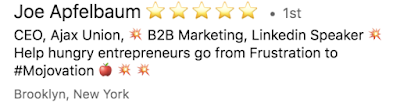
Here are some great headlines:
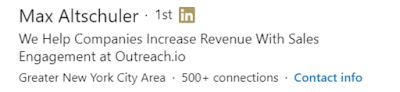

Everybody has a story about their career, values, and experiences so you can maximize this section to tell your story authentically. You can use this section to further attract attention to your profile, especially if you are looking to move from your current role.
For sales people, your prospects look at your profile and decide from there to connect with you or not. Hence, it is important to showcase in your summary the benefits of connecting with you or even engaging with you. As a tip, you can check your company's unique selling proposition or value prop and tweak it to fit your summary.
Don't forget to include keywords that are relevant to your expertise and your role.
What better way to use LinkedIn to build your authority and validate your credentials is to share, create, and curate content that will resonate to your target audience.
When I was doing B2B, one way I did it is by leveraging the content that our company was creating and distributing. I frequently shared relevant topics on my feed, including my own perspective. Another tip for salespeople is to compose and publish your own original content that is tied to the industry you are focusing on.
If you are a leader in your company or a specialist in a vertical, you can offer to write your insights to your marketing department, which they can publish on your company's website and social media channels.
Although you have to request Recommendations proactive, this is a powerful section to affirm your experience and skills. It is like a testimonial that your co-worker, boss, teammate, or peer can positively write about you.
A good strategy to do this is by writing a recommendation for that connection you are requesting it from. I am sure it won't hurt if you would genuinely compose a testimonial that uplifts that person, too. In that way, it would be a bit embarrassing for that person not to return the favour.

If you would detail your work history, avoid copy/pasting every job description of the positions you've held. Strategically articulate your achievements and skill set in each role instead. The goal here is to showcase your value in your experience.
If your goal is to land a new job, the recruiter will be vetting whether you are a good fit to the role. That said, it is paramount to align your values and experience with your target position.
Increased my book of business by XX% YOY through cold calling and email, and LinkedIn prospecting
Launched XX project in XX weeks/months and achieved [value]
Oversaw a team of X in the [vertical] and managed to exceed quota
Leveraged LinkedIn Sales Navigator to convert XX leads to clients
Let's say you're a digital marketing manager. A paragraph form of your experience section can be like this:
(A) Led a team of two digital marketing executives to increase conversion and revenue of our e-commerce business. In X [timeline], we achieved [amount] revenue by implementing digital marketing strategies that attracted more potential buyers to our website. In [year], our contribution to the total business grew from X% to X%.
(B) Oversee and manage all aspects of digital marketing, including SEO & SEM and social media channels. In [year], we have improved our rankings in the SERPs by X%. This resulted to increased inbound leads generated for our inside sales, which is equivalent to X [amount] in new business.
Early this year, LinkedIn has launched the new "Featured" section to highlight achievements and links. This is a great element to showcase and demonstrate examples of your work, achievements, or projects prominently.

After completing all the sections of your profile and achieving an All-Star profile strength, remember that LinkedIn is a professional networking platform as well. Get connected with your industry peers and create meaningful connections.
With the benefits of creating a profile on LinkedIn, it is certainly a tool you need to maximize. Whether you are looking for a career move or wanting to grow and expand your professional network, you can make the most of LinkedIn to stand out.

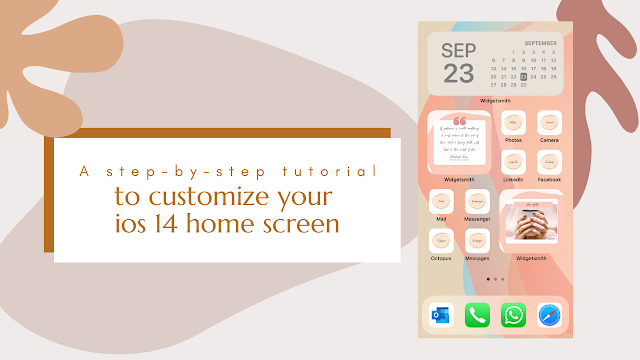
With the recent release of iOS 14 update, everyone went gaga over the personalisation of their widgets. I, too, took some time to customize my widgets by using third-party apps. If you want to achieve a certain aesthetic or theme, it'll take you an amount of time to download and go back and forth apps to do it.
As for me, I wanted to achieve a beige minimalist feel on my home screen. I actually put down on paper the layout that I prefer. After a few searches on which apps are the best to use and doing it, I want to put it out here to help you figure out how to customize your home screen and widgets.

1. Decide on the color palette or theme you want. You could do a dark theme, a minimalist one, branded one, or anything that suits your liking.
2. You will have to download the Widgetsmith and the Shortcuts app to create your own.
3. In the Widgetsmith, you will have the option to create small, medium, or large widgets. You can choose which tools you want to add like your calendar, reminders, photos, weather, etc.
4. You can also customize the color, background, and font of the widgets.
5. For the shortcuts, get into the app and create every shortcut you wish as your options are endless as to which icons, color, or theme you want to use.
6. I've used Canva to create a thematic icons for my shortcuts.
Here's a step-by-step video I created to help you customize your home screen.


 Social Media
Like myself, we’re here on LinkedIn to connect with our professional network to bring …


